
Every financial services team has a version of this problem: project status tracked in one Excel sheet, bugs in another, team assignments in a third and nobody is quite sure which file is current. Multiply that by five departments, fifty people, and a compliance clock ticking in the background. We fixed it.
Here is exactly what we built.
What the Client Was Dealing With
Before Preflex came in, the organization was running its entire software delivery operation on Excel spreadsheets. Different teams maintained different files. There was no single view of what was in progress, what was blocked, or where the delays were hiding.
This created real problems:
The organization needed one place, one system, one truth.
What We Set Out to Do
Our objective was to move the entire organization onto Jira with a structured, standardized Agile methodology not just “use Jira” but configure it properly so every department could manage its own work while leadership had full visibility across all of it.
Each client engagement would be managed as its own Jira project, with a dedicated board, defined workflows per department, and a single Change Request (CR) Epic tying everything together.
We also had to make this configuration reusable so that every new client project going forward could be set up fast, consistently, and without starting from scratch.
The Architecture We Designed
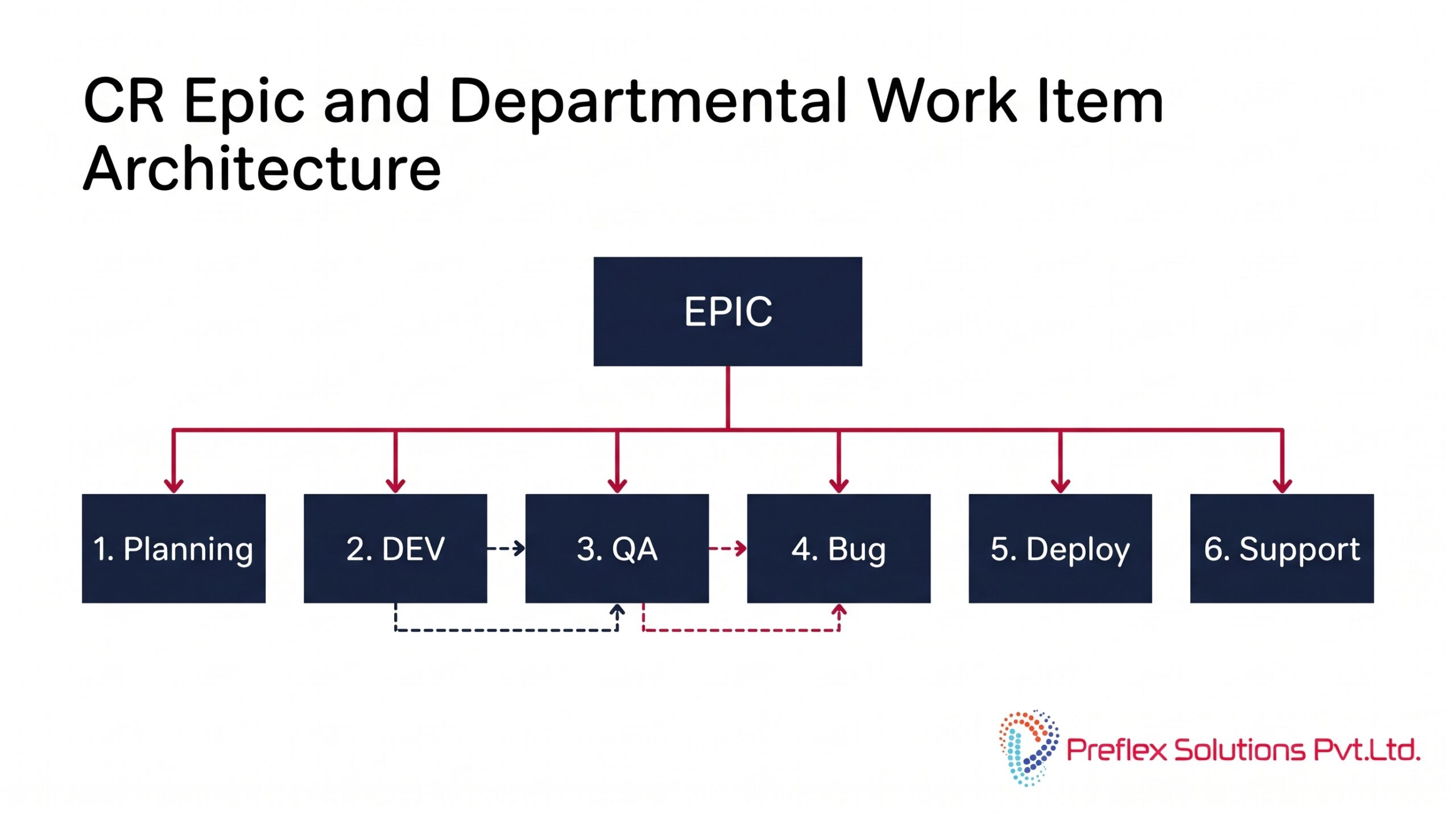
The entire solution is built around a single CR Epic that acts as the parent work item for each Change Request. Under it, each department creates and manages its own child work items:
The Epic does not auto-complete its child items departments work in parallel, and no fixed sequence is enforced. Traceability between DEV, QA, and Bug work items is maintained through Jira issue links (“relates to”, “relates to — defect raised”, “relates to — fix implemented”).
The 6 Workflows We Configured
This is where most Jira implementations go wrong generic workflows that don’t reflect how the team actually works. We built six purpose-built workflows:
1. CR Epic Workflow
Tracks the full Change Request lifecycle from initial intake through business analysis, proposal approval, delivery, UAT, production deployment, and closure.
2. Business Analysis (BA) Workflow
Covers requirement creation, feasibility check, effort estimation, BRD and FSG creation, proposal creation, and approval gates before work proceeds.
3. Development Workflow
Sprint planning, active development, code review, and handoff to QA with clear status transitions that prevent work moving forward without the right sign-offs.
4. Quality Assurance (QA) Workflow
Test planning, test execution, validation, defect logging linked back to DEV, and QA sign-off before UAT begins.
5. Bug Lifecycle Workflow
Defect identification, triage, assignment, active resolution, verification, and closure fully linked to the QA and DEV workflows for complete traceability.
6. Pre-Production Workflow
Production readiness checks, production approval, go-live coordination, and post-deployment monitoring before the CR Epic is closed.
Permissions and Access Control
We built a full permission matrix across all five department groups BA, Development, QA, Bug Management, and Deployment. The matrix controls who can create, edit, transition, and close each type of work item, ensuring that no team can accidentally (or intentionally) move work forward without the right role performing the right action.
Access control considerations include preventing unauthorized status transitions, restricting field-level edits to appropriate roles, and ensuring that sensitive project data is visible only to the teams that need it.
Reusable Configuration : The Long-Term Value
A one-time implementation would not have been enough. We built the entire Jira configuration to be reusable across all future client projects.
A demo project was used to validate every workflow, permission scheme, work type, and board configuration before it went near a live client environment. Once validated, new projects can be created by importing the same scheme set workflows, permissions, boards, and issue type hierarchy all carry over.
This means:
The Result
The organization moved from a fragmented, spreadsheet-based way of working to a fully structured Agile environment in Jira with real-time visibility across all departments, a single source of truth for each Change Request, and the foundation to scale.
Leadership can now see exactly where any CR is in its lifecycle at any moment. Department teams manage their own work independently without losing traceability. And every new client engagement starts with a proven, battle-tested Jira configuration from day one.
Want This for Your Organization?
If your team is still tracking projects in Excel — or using Jira but with workflows that don’t actually fit how you work — we can help. Our Jira Health Check and Implementation services are designed specifically for organizations that want to get Jira right the first time.
Get in touch to book a free consultation